Products / Nexoria.ERP

Nexoria.ERP

A complete, multi-company ERP for manufacturing — covering the full flow from purchase to production, sales, finance and costing, with built-in inter-unit transfer and a real costing engine.

Built for scale

One ERP across your entire group

Nexoria.ERP runs multiple companies, units and locations on a single platform with shared masters and role-based control.

Multi Company
Multi Plant
Multi Warehouse
Multi Currency
Multi Financial Year
Role-Based Access
Organizational hierarchy

Model your business exactly as it runs

Ten configurable levels let Nexoria.ERP mirror your real structure — from the group down to each employee — so data rolls up correctly for reporting and costing.

1Group MasterTop-level holding entity
2Company MasterLegal companies under the group
3Business UnitOperating units within a company
4DivisionProduct/vertical divisions
5PlantManufacturing plants
6WarehouseStorage locations
7Profit CentreP&L accountability points
8Cost CentreCost accumulation points
9DepartmentFunctional departments
10EmployeeIndividual users/staff
Modules & process flow

Every module, described process by process

Each Nexoria.ERP module follows a clear, controlled flow. Here is exactly what happens at each step.

Purchase Management

Manages the full procurement cycle from raising a demand to paying the vendor, with approvals and quality checks built in.

Procure to Pay
  1. 1
    Purchase IndentA department raises a demand for the materials it needs.
  2. 2
    Purchase RequisitionIndents are consolidated and approved into a formal requisition.
  3. 3
    RFQA request for quotation goes out to shortlisted vendors.
  4. 4
    Vendor QuotationVendors submit their prices, terms and lead times.
  5. 5
    Quotation ComparisonQuotes are compared side by side on price, terms and delivery.
  6. 6
    Purchase OrderA PO is issued to the selected vendor.
  7. 7
    Goods Receipt (GRN)Delivered materials are received and booked against the PO.
  8. 8
    Quality InspectionIncoming goods are inspected and accepted or rejected.
  9. 9
    Purchase InvoiceThe vendor invoice is booked against the GRN.
  10. 10
    Accounts PayableThe payable is recorded in the vendor ledger.
  11. 11
    Payment to VendorPayment is released and reconciled.

Inventory Management

Keeps real-time control of stock across warehouses with movements, counts and valuation.

Stock Control
  1. 1
    Raw Material StockLive stock of raw materials by item and location.
  2. 2
    Stock Transfer (Within Warehouse)Move stock between bins or areas inside a warehouse.
  3. 3
    Stock AdjustmentCorrect stock for damage, loss or reconciliation.
  4. 4
    Stock CountCycle-count selected items without stopping operations.
  5. 5
    Physical VerificationFull physical stock-take compared against the system.
  6. 6
    Stock Issue to ProductionMaterials are issued against production orders.
  7. 7
    Stock Transfer (Inter Unit)Move stock across units or plants (links to the IUT flow).
  8. 8
    Stock ReturnReturn unused or rejected material to stock or vendor.
  9. 9
    Closing StockPeriod-end stock is valued for accounts and costing.

Production Management

Drives manufacturing from demand and MRP through work orders, quality checks and finished-goods receipt.

Plan to Produce
  1. 1
    Sales Forecast / DemandExpected demand drives the production plan.
  2. 2
    Production PlanningOutput is planned against demand and available capacity.
  3. 3
    MRPMaterial requirements are calculated from the plan and BOM.
  4. 4
    Production OrderA work order is released to the shop floor.
  5. 5
    Material IssueRaw materials are issued to the production order.
  6. 6
    Production / Job WorkManufacturing or outsourced job work is executed.
  7. 7
    In-Process Quality CheckQuality is verified during production, not just at the end.
  8. 8
    Finished Goods ReceiptCompleted goods are booked into stock.
  9. 9
    PackingFinished goods are packed for dispatch.
  10. 10
    FG Stock in WarehouseFinished goods are stored and made available for sale.

Sales Management

Handles the customer cycle from enquiry to receipt, keeping dispatch, invoicing and receivables in sync.

Order to Cash
  1. 1
    Sales InquiryA customer enquiry is captured.
  2. 2
    QuotationA quotation is issued to the customer.
  3. 3
    Sales OrderThe confirmed order is recorded.
  4. 4
    Order ApprovalCredit limit and terms are approved.
  5. 5
    Delivery PlanA dispatch schedule is prepared.
  6. 6
    Delivery ChallanGoods are dispatched with a delivery challan.
  7. 7
    Sales InvoiceThe invoice is raised to the customer.
  8. 8
    Customer ReceiptPayment is received and applied to the invoice.
  9. 9
    Credit / Debit NoteReturns and corrections are adjusted.
  10. 10
    Accounts ReceivableOutstanding amounts are tracked in the customer ledger.

Finance Management

A complete accounting core that captures every transaction and produces statutory financial statements.

Books & Compliance
  1. 1
    Journal VoucherRecord non-cash accounting entries.
  2. 2
    Receipt VoucherRecord money received.
  3. 3
    Payment VoucherRecord money paid out.
  4. 4
    Contra VoucherRecord cash and bank transfers.
  5. 5
    Debit / Credit NoteAdjust customer and vendor balances.
  6. 6
    Bank ReconciliationMatch the books against bank statements.
  7. 7
    General LedgerThe master record of every account.
  8. 8
    Trial BalanceConfirm that debits equal credits.
  9. 9
    Profit & LossIncome versus expenses for the period.
  10. 10
    Balance SheetA snapshot of assets, liabilities and equity.
  11. 11
    Cash FlowThe movement of cash across the business.

HR & Payroll

Manages people from employee master to payroll, including attendance, leave and statutory deductions.

Hire to Retire
  1. 1
    Employee MasterCentral record for every employee.
  2. 2
    AttendanceCapture daily attendance and shifts.
  3. 3
    Leave ManagementApply for, approve and track leave.
  4. 4
    Payroll ProcessCalculate salaries, allowances and deductions.
  5. 5
    Salary SlipGenerate payslips for staff.
  6. 6
    PF / ESI / TDSHandle statutory deductions and filings.
  7. 7
    Payroll AccountingPost payroll results into the books.

Other Modules

Additional modules that round out the platform for assets, quality, maintenance, CRM and projects.

Extended Operations
  • Fixed AssetsTrack assets, depreciation and disposal.
  • Quality ManagementInspection plans, parameters and non-conformance.
  • Maintenance ManagementPreventive schedules and breakdown handling.
  • CRMLeads, follow-ups and customer engagement.
  • BudgetingSet budgets and monitor against actuals.
  • Project ManagementPlan, execute and track projects.
  • MIS DashboardReal-time KPIs for management.

Reports & MIS

A full reporting suite giving operational and financial visibility across the whole group.

Insight
  • Stock & Item LedgerStock report, item ledger and warehouse stock.
  • Purchase & Sales RegisterComplete purchase and sales registers.
  • Production ReportOutput, consumption and efficiency.
  • Inter Unit Transfer ReportAll transfers across units and companies.
  • Profit Centre P&LProfitability by profit centre.
  • Cost Centre ReportCost accumulation by cost centre.
  • Vendor & Customer OutstandingPayables and receivables ageing.
  • Cash Flow & Budget vs ActualCash position and budget variance.
  • MIS DashboardConsolidated management dashboard.
Inter Unit Transfer (IUT)

Move material and value between units correctly

Nexoria.ERP handles four transfer scenarios — from a simple bin move to a cross-company transfer — each with the right approvals, documents and accounting.

1. Warehouse → Warehouse (Same Plant)
  1. Transfer Request
  2. Approval
  3. Stock Issue
  4. Transit (if required)
  5. Stock Receipt
  6. Inventory Updated
2. Plant → Plant (Same Business Unit)
  1. Transfer Request
  2. Plant Approval
  3. Transfer Order
  4. Material Issue
  5. Dispatch / Transport
  6. Goods Receipt
  7. Inventory Updated
3. Business Unit → Business Unit (Same Company)
  1. Source BU Approval
  2. Destination BU Approval
  3. Transfer Order
  4. Material Issue
  5. Dispatch / Transport
  6. Goods Receipt at Destination
  7. Inter Unit Invoice
  8. Accounting Entry (Inter Unit Clearing)
4. Company → Company (Different Company)
  1. Sales Order (Source)
  2. Purchase Order (Destination)
  3. Material Issue (Source)
  4. Invoice (Source)
  5. Goods Receipt (Destination)
  6. Purchase Invoice (Destination)
  7. Accounting Entry (Inter-Company A/c)
  8. Payment Settlement

Transfer supporting documents

Every transfer is backed by the right paperwork for traceability and audit.

  • Transfer Request (IUTR)Initiates the transfer.
  • Transfer OrderAuthorises the movement.
  • Material Issue NoteRecords goods leaving the source.
  • Dispatch Note / Gate PassControls goods exit.
  • Transit TrackingTracks goods in movement.
  • Goods Receipt NoteConfirms receipt at destination.
  • QC Inspection ReportRecords quality on receipt.
  • Inter Unit InvoiceValues inter-unit movement.
  • Inter-Company Accounting EntryBooks the transaction on both sides.
  • Payment SettlementSettles inter-company dues.
Costing flow

Know the true cost of everything you make

Cost flows with the material at every stage, so finished goods land in stock fully costed.

STEP 01Raw Material PurchaseBuy materials from vendors
STEP 02Raw Material ReceiptReceive and inspect goods
STEP 03Storage (RM Store)Hold in the raw-material store
STEP 04Material IssueIssue to production orders
STEP 05Production ProcessConvert material into product
STEP 06Finished Goods ReceiptBook finished goods with full cost

Raw Material Cost

Purchase Price + Freight + Insurance + Loading/Unloading + Other Charges − Purchase Return.

Direct Cost

Direct Material + Direct Labour + Direct Expenses — the costs tied straight to the product.

Production Overheads

Indirect material & labour, factory overheads, utilities, maintenance and depreciation.

Costing output & methods

Nexoria.ERP builds cost up in stages and supports the costing method your business uses.

  1. 1
    Prime CostDirect material + direct labour + direct expenses.
  2. 2
    Factory CostPrime cost + factory overheads.
  3. 3
    Cost of ProductionFactory cost + administrative overheads.
  4. 4
    Cost of Goods ManufacturedAdd opening WIP, less closing WIP.
  5. 5
    Cost of Goods ProducedAdd finished-goods overheads.
  6. 6
    Total Cost of GoodsThe fully loaded cost ready for pricing.
FIFOWeighted AverageStandard CostingActivity Based CostingProcess CostingJob Order Costing

Item-wise cost sheet

Every finished item carries a transparent cost breakdown, so pricing and margins are based on real numbers — not guesswork. Below is a sample build-up from raw material all the way to selling price.

ParticularsAmount (₹)
Raw Material Cost1,000.00
Direct Labour250.00
Direct Expenses50.00
Prime Cost1,300.00
Factory Overheads300.00
Factory Cost1,600.00
Administrative OH80.00
Selling & Distribution OH120.00
Total Cost1,800.00
Profit Margin (10%)180.00
Selling Price1,980.00
Common workflow

The same disciplined flow in every module

Whatever the transaction, Nexoria.ERP moves it through the same six controlled stages.

1

Request / Transaction

A user initiates an action.

2

Data Entry / Capture

Details are entered or captured automatically.

3

Approval Workflow

The right people approve based on rules.

4

Posting / Updating

Records and stock update.

5

Accounting Impact

The financial effect is booked.

6

Reporting / Dashboard

Results appear in reports and dashboards.

Role-based approval hierarchy

Approvals route up the chain automatically, with full audit trail.

1Store Officer
2Warehouse Manager
3Plant Head
4BU Head
5Finance Manager
6Director / MD
Full architecture

The complete Nexoria.ERP flow at a glance

Purchase, inventory, production, sales, finance, inter-unit transfer and costing — one connected system. A full-resolution copy is included with your files.
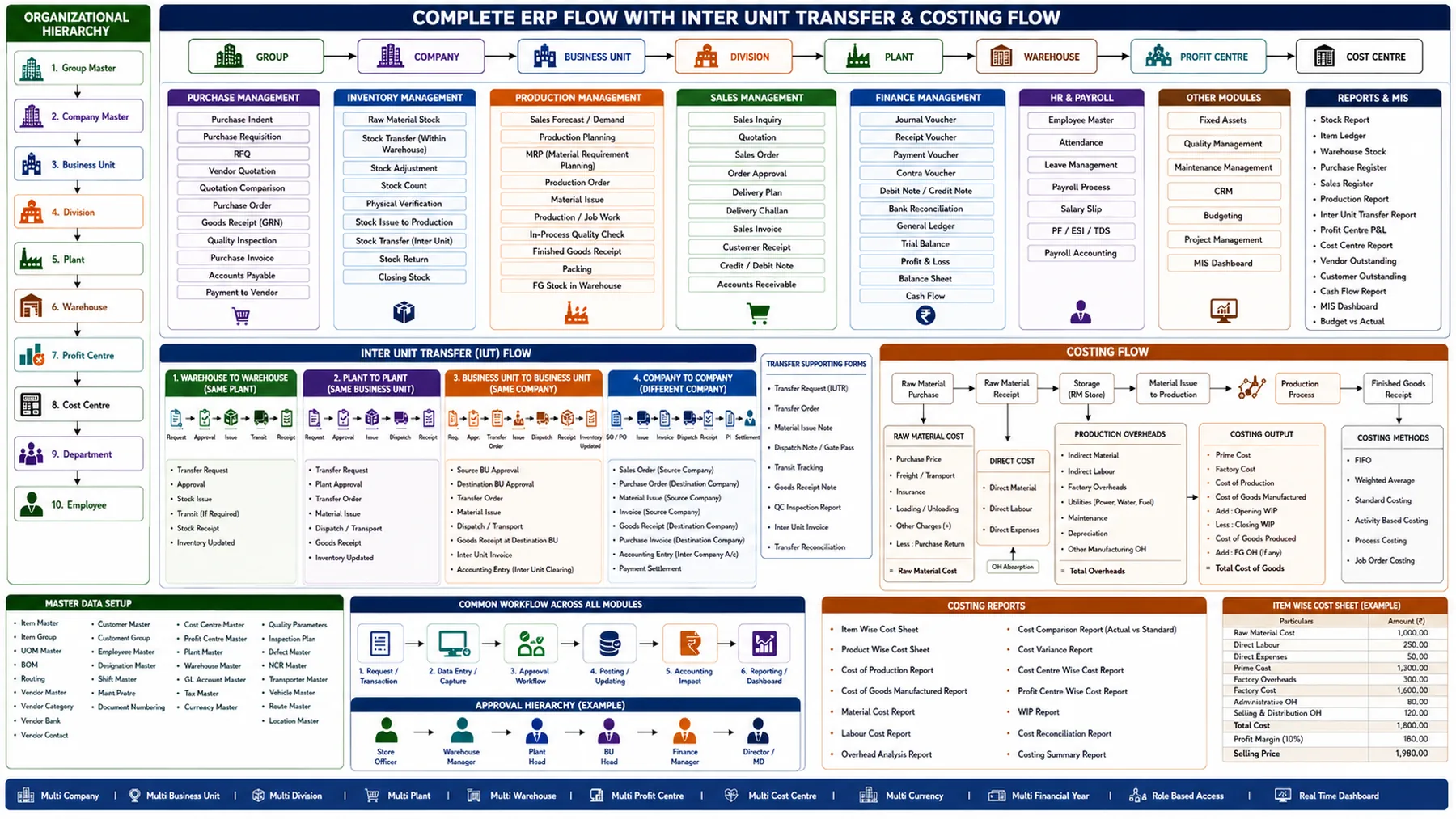
Nexoria.ERP complete ERP flow with inter unit transfer and costing

See Nexoria.ERP on your own processes

We’ll run a demo mapped to your company structure, from purchase to costing.